





The following items will be deployed on February 26, 2026. Please note that this list doesn’t include other internal and regular maintenance work that BenchPrep is releasing.
New Features and Enhancements
Select Multiple Courses When Creating In-App Messages
In-App Messages can now be assigned to multiple courses at once. When creating an In-App Message in Console, admins can select one or more specific courses rather than being limited to a single course or all courses, and apply the message across all selected courses in a single step.
An “All” option is also available to quickly select all courses. Validation ensures that at least one course is selected before saving.
Improved Study Plan User Interface
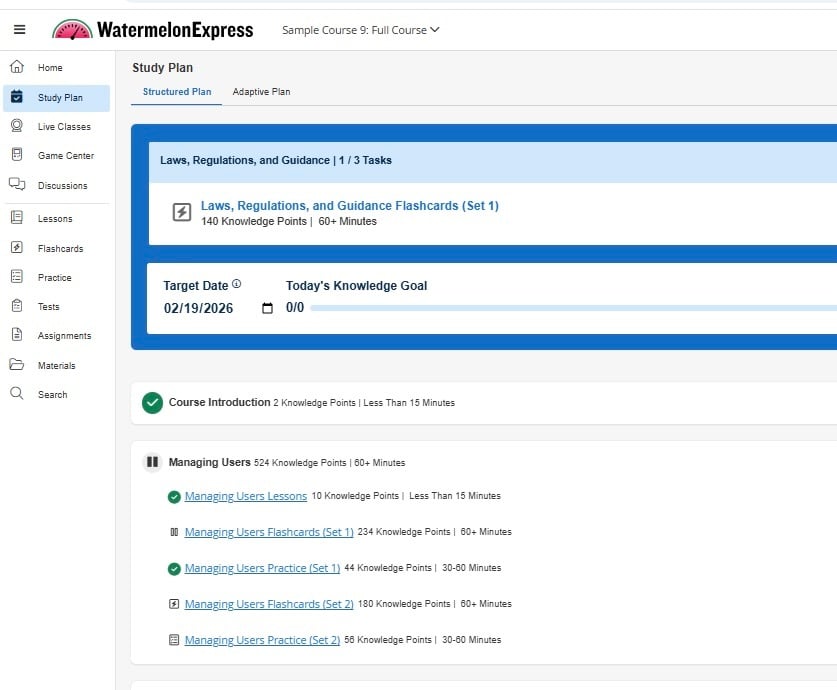
Study Plan visual design has been improved to make it easier for learners to distinguish between completed and incomplete items. Enhanced visual indicators and added color variation help learners quickly identify what’s done and what still needs attention across tasks, titles, and section headers.
These updates provide a clearer and more intuitive Study Plan experience overall.
AI Assistant Chat and Footer Updates
-1.png?width=406&height=637&name=image%20(4)-1.png)
We’ve refreshed the AI Assistant chat experience with visual and layout improvements to the chat area, loading state, and footer.
This consists of updated message styling and a new “Generating response…” indicator to improve clarity while responses are being created. The footer now includes a larger input field, updated active styling, and a repositioned send button. These updates apply to both desktop and mobile views.
BenchPrep Analytics: Search Added to Group Filter Modal
We’ve added a search bar to the Group filter modal, so you no longer need to scroll through long lists to find the group you’re looking for. Users can now quickly search and select groups by name, making filtering faster and easier.
BenchPrep Analytics: Curriculum Reporting Added to User Detail
Curriculum reporting is now available in User Detail. This highly requested update provides clearer visibility into how users are progressing through curriculum content within a course.
Admins can view key metrics like tasks completed and average scores, along with a detailed breakdown of progress, time spent, and completion dates for each curriculum and its associated tasks.


