





The following items will be deployed on December 18, 2025. Please note that this list doesn’t include other internal and regular maintenance work that BenchPrep is releasing.
New Features and Enhancements
AI Assistant | Self-Service Controls for Course Ingestion & Referential Sources
Admins can now fully manage how the AI Assistant accesses course content independently.
- Tenant-level ingestion: A new Referential Sources tab in AI Settings lets tenant admins ingest courses and manage which ones the AI Assistant can use for referential context through a simple dual-picker.
- Course-level controls: Each content package now includes an AI Referential Sources tab, allowing admins to add or adjust course-specific context sources. Access context, permissions, and upsell gating are all enforced.
This gives admins full, self-service control over which courses power the AI Assistant—both globally and at the course level—making setup faster, cleaner, and far more flexible.
Learn more about AI Assistant here.
Ability to Propagate Assignments
Assignments created in a Bank course can now be updated and automatically pushed to all courses that previously copied them. This makes it easy to keep instructions, rubrics, settings, traits, and other content in sync across large programs without manually updating each course. Learner progress and submissions remain untouched, and admins receive a confirmation showing how many courses were updated.
Assignments now appear in the Propagation Queue alongside other content types, creating a more streamlined and consistent content-management workflow.
Learning Hub: Score Summary Now Available on Course Tiles
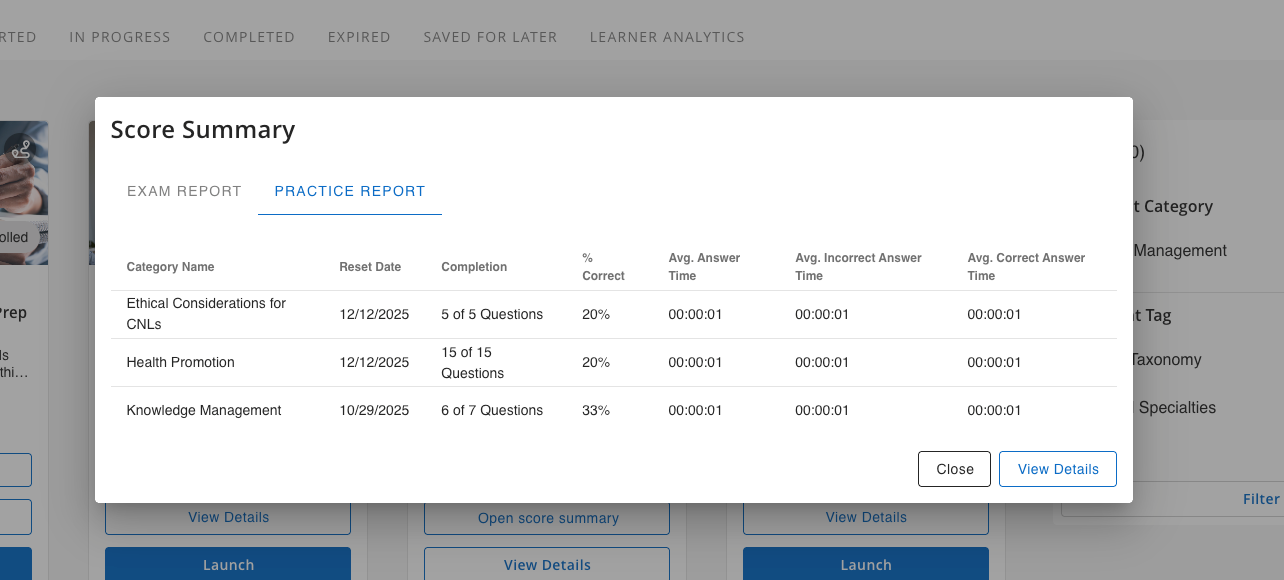
Learners can now view a snapshot of their practice and exam performance directly from the course tile. When Score Reports for Exams and/or Display Previous Practice Session Reports are enabled, a new Open Score Summary button will appear on the tile, giving learners instant access to the same practice and exam data introduced on the updated Course Details page in our last deployment.
This view displays results in a familiar, tabbed layout and includes visibility into activity from both practice and exam reset results. Admins may also choose to display a “Last Attempt” line on the course tile, highlighting the learner’s most recent practice session or exam attempt, if Expose Last Attempt Data is enabled.
This enhancement provides learners with a convenient, at-a-glance understanding of their progress without needing to enter the course.
ExamSim: New Notes Functionality for Questions and Review
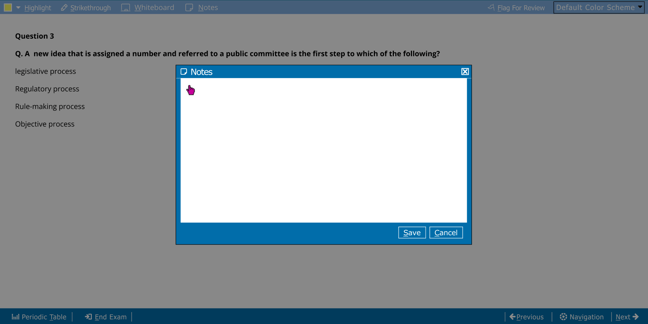
Learners can now take notes while on ExamSim. A new Notes button opens a text panel where learners can type and automatically save their thoughts, then return to them at any time. Notes also appear during review: a Notes column is added to the Review page and Navigation modal, with an icon indicating which questions contain saved notes.
Clicking the icon reopens the note, and a hotkey is available for quick access while answering. This update gives learners a simple, flexible way to track reasoning and revisit it later.
This new Notes functionality is only available in select ExamSim experiences. Contact your CSM to learn more.
Learn more about ExamSim here.


