





The following items will be deployed on September 3, 2026. Please note that this list doesn’t include other internal and regular maintenance work that BenchPrep is releasing.
New Features and Enhancements
AI Assistant
AI Assistant: Updated Model for Improved Response Quality
We're introducing GPT-4o Mini in the AI Assistant to improve how it interprets learner questions and generates responses.
This update brings better accuracy, more reliable handling of course-specific content, and improved overall response quality, all while helping manage platform costs. The updated model will be automatically introduced with no action needed on your end. Reach out to your CSM if you would prefer to remain on the GPT-5.5 version.
ExamSim
Clearer ExamSim Configuration Guidance in BluePrint
We've added validation and updated guidance in BluePrint to prevent ExamSim configurations that aren't currently supported, helping admins avoid broken exam experiences before they reach learners.
Previously, BluePrint allowed certain answer explanation options to be selected and saved for ExamSim courses, even though only the standard answer explanation option is compatible with full-length and short ExamSim exams. Admins could unknowingly save an unsupported configuration, resulting in a broken experience for learners.
Now, unsupported options are flagged during setup, and updated in-product guidance makes it clear which answer explanation option works with ExamSim.
BluePrint
Assignments
- Assignment Templates: Relative Dates
Assignment Templates can now use relative start dates, making it easier to reuse the same template across programs or cohorts with different schedules.
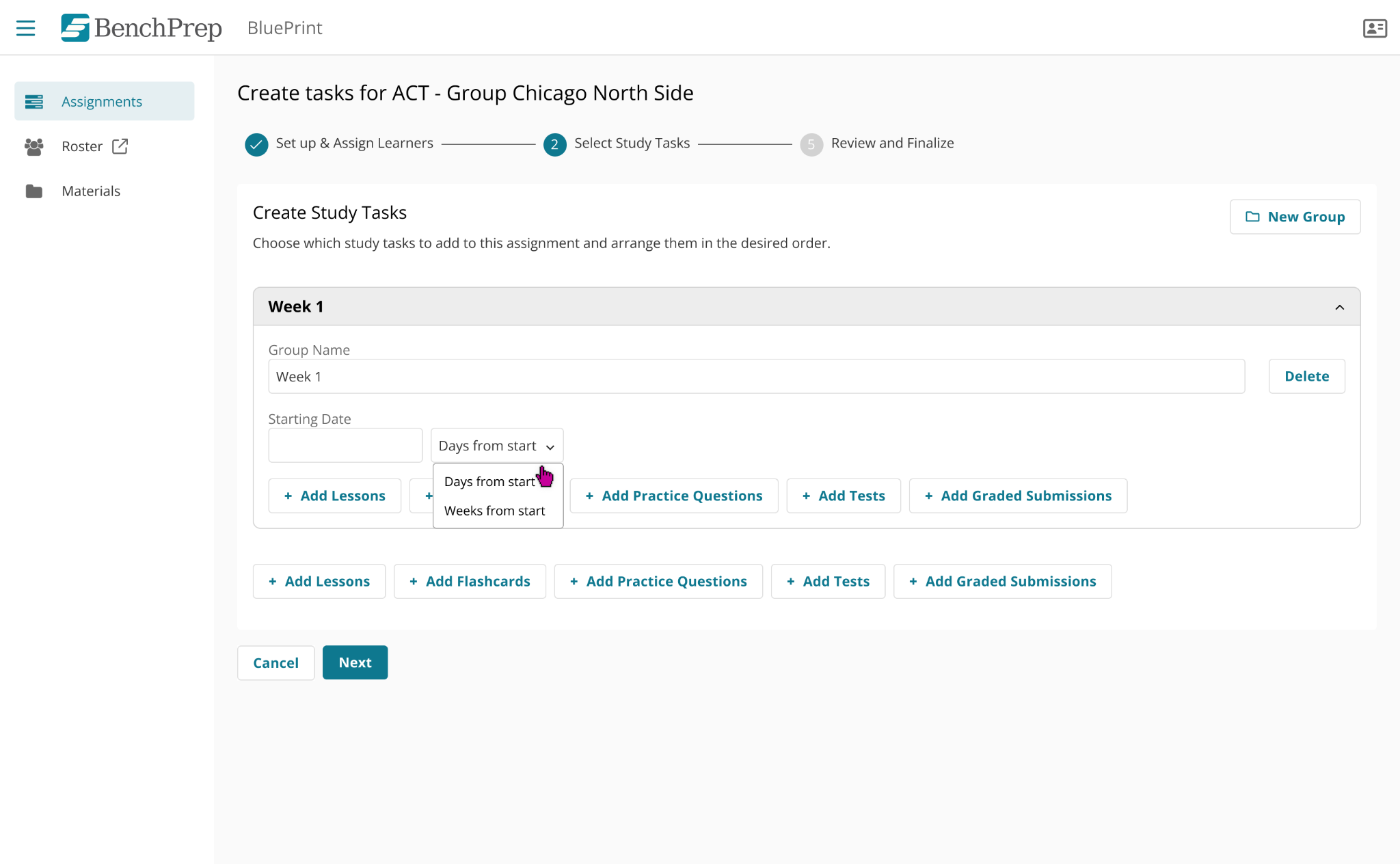
Instead of setting fixed calendar dates, admins can define when each assignment group should begin based on a number of days or weeks from the program start. When creating an assignment from a template, admins simply enter the program start date, and BluePrint automatically calculates the appropriate dates for each group.
This reduces manual date adjustments and makes Assignment Templates more flexible and reusable.
- Assignment Templates: More Granular Permissions
Organizations now have more control over who can manage Assignment Templates in BluePrint with new dedicated permissions for viewing, creating, editing, and deleting templates.
These permissions are separate from assignment permissions and respect each admin's assigned scope, such as their branch or group. This allows admins and instructors to work with assignments without automatically giving them access to manage Assignment Templates outside their authorized scope.
- Assignments: Question Category Tasks Now Launch Category Practice
When an admin assigns a question category as an assignment task, learners will now be placed into a focused Category Practice session for that category, rather than a Custom Practice session.
This change creates a clearer, more intentional experience for learners working through assigned content, and decouples category-based assignment tasks from the Custom Practice feature. As part of this update, the Question Category selection in the assignment stepper has also been updated to allow only one category per task, ensuring each assignment task maps to a single, well-defined practice experience.
Asset Library: Search, Sort, and Filter Now Available
Finding the right asset in BluePrint's asset library is now much easier. Content managers can search, sort, and filter assets directly from the asset listing page.
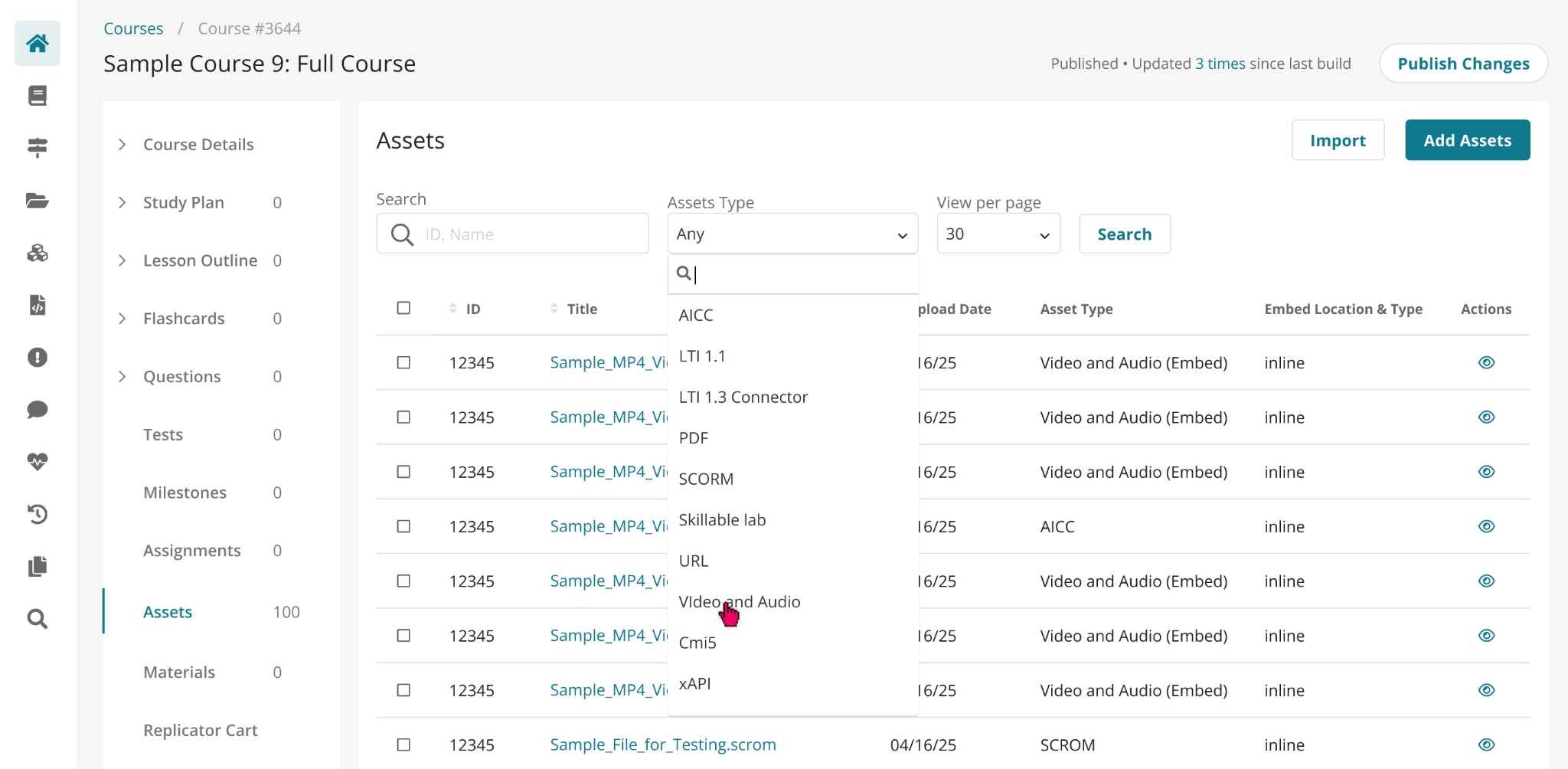
The same search and filtering capabilities available on other listing pages in BluePrint are available for assets, so you can quickly find video files, images, or other media without scrolling through everything.
Improved Support for Live Dynamic Exam Updates
Content managers can now make changes to live Dynamic Exams in BluePrint without disrupting learners who have already started or completed an exam.
When questions or question families are updated or removed, BenchPrep automatically revalidates affected exam attempts to keep them in a usable state. Learners with exams in progress can continue and complete their attempts, while completed exams remain complete.
This gives content managers greater flexibility to maintain and update Dynamic Exams after they are live while minimizing disruption to learners.
Learner Experience (WebApp)
Chillouts Feature Retired
The Chillouts feature has been removed from the platform as of this release.

Utilization was relatively low compared to our core learning tools, and the feature played a limited role in the overall learning experience. Continuing to evolve Chillouts would also require additional investment.
As a result, we’re focusing our product development efforts on capabilities more closely aligned with learning outcomes and areas where we can deliver the greatest impact for our customers. This allows us to continue investing in the features learners and administrators rely on most.
Learning Hub
Enhanced Learner Analytics Performance Insights
We've enhanced the % Correct by Tags chart in Learner Analytics to give learners more control and context when reviewing their performance
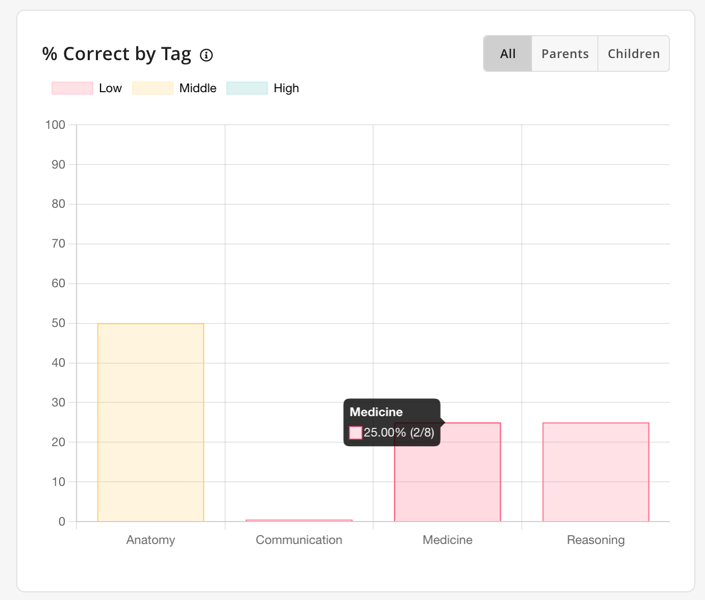
Learners can now choose to view parent categories, child categories, or both. Long tags display shorter names by default, keeping the chart clean and easy to scan, while hovering over a tag still shows its full name. Updated hover details also show the number of questions answered correctly out of the total, the percentage correct, and a low, middle, or high performance indicator.
Together, these updates make it easier for learners to understand their performance across content areas and identify where they may need additional focus.
Display names can be revised in Console under Settings > Tenant Detail > Content Tags.
Learn more about Learner Analytics here.


