





The following items will be deployed on November 5, 2026. Please note that this list doesn’t include other internal and regular maintenance work that BenchPrep is releasing.
New Features and Enhancements
BenchPrep Analytics
Preserve Completed Exam Results with Live Exam Updates
Live Exam Updates introduces an important change to how completed exam results are handled when exam content is updated. When enabled, learners retain their original scores and can review the questions, answers, and passages as they appeared when they completed the exam, even if the content has since changed.
This functionality is managed by BenchPrep and applies across all courses once enabled. We encourage administrators to familiarize themselves with Live Exam Updates to better understand how it works and its impact on exam results and reporting. Click here to learn more.
Improved Accuracy in Assignment Progress Tracking
Assignment progress in the Webapp Assignment Dashboard now weights each task by its items’ study duration, improving accuracy and aligning progress calculations with Blueprint. Longer tasks contribute more than shorter ones, giving learners a consistent view of their progress across both experiences.
This update applies when the Assignments feature is enabled.
Clearer Labels for Locked Content
Learners now get full context on locked content — exactly why it's locked and when it becomes available. Assignment-locked content now shows an "Available [date]" label, while premium- and milestone-locked content displays a clear label alongside the lock icon. No more guessing — learners can focus on what's accessible and plan ahead for what's coming.
These labels appear across the Webapp, including the Study Plan’s Assignment tab and the Tests dashboard.
More Accurate Progress Tracking in Custom Practice
When learners end a Custom Practice session early or run out of time, unanswered questions retain their previous correct or incorrect status. This preserves progress tracking and helps learners continue practicing those questions. Questions that have never been answered return to the unseen question pool.
This update applies when “Enable Custom Practice Session Feature” is turned on.
BluePrint
Review Assignment Content Directly in Blueprint
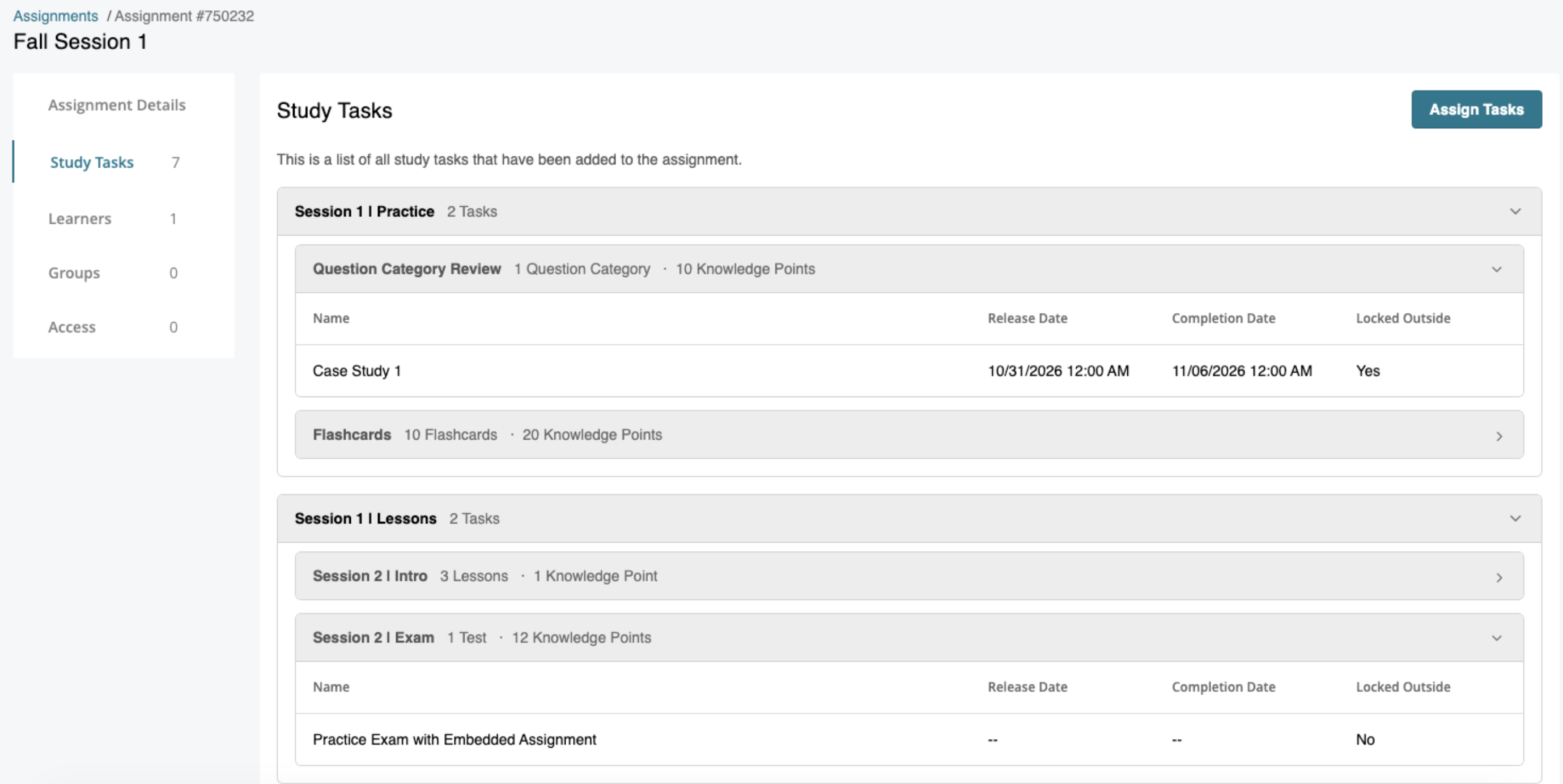
Instructors and Group Managers can now review assignment content in Blueprint without editing the assignment — making it easy to see exactly what learners have been assigned. A read-only Study Tasks tab displays all tasks with expandable groups showing content, release dates, and completion dates at a glance. Assignment templates now use the same preview format, replacing the previous modal with a full preview page.
Console
Console Assistant: Manage Admin Tasks Through Chat
Console Assistant lets admins complete tasks simply by asking. Use the chat interface to enroll a student, grant a license, or build a plan, reducing the need to navigate through Console.
Previewed at our Q4 Customer Roadmap Forum, Console Assistant is available on a limited basis. To participate, reach out to your Customer Success Manager.
Get Deeper Insights into Assignment Completion and Performance
Instructors can now see which students completed a specific assignment or task by selecting the student completion count in Assignments, Tasks, Lessons, Flashcards, and Questions reports. A popup lists the students included in the selected count, with an option to export the list to CSV.
New assignment drill-downs in user and course assignment reports help instructors move beyond average scores to review individual results and identify questions learners struggle with. Links open the relevant lesson, flashcard, or question report based on the task type and appear only when the corresponding feature is enabled.
Expanded Exam Results Data and Enrollment Sync Improvements via GraphQL
Partner integrations can now use their own IDs to find course packages and track enrollments, making it easier to keep records in sync with BenchPrep. We’ve also updated the Exam Results query to return richer data per attempt, supporting more comprehensive reporting and certification tracking workflows.
Additional GraphQL Fields
Exam Results Query
- Category Performance: Access per-question-category performance metrics, including scaled scores, percentile rankings, correct and incomplete answers, and average answer time
- Pass/Fail Status: Access pass/fail results for each attempt directly through GraphQL; derived from the exam's configured passing threshold, with "N/A" returned when no threshold is configured
- Learner Information: Access learner identifiers — user ID, email, and SIS ID — to support reporting and integration workflows
Content Packages Query
- Added exact-match externalId filter — look up a course by external identifier without relying on full-text search
Enrollments
- enrollment.externalId is now readable
- externalId is now settable on licenseCreate, applied to all enrollments created by that call
- Single-course purchases now correctly scope enrollment to the specified course only
As always, our automatically updated GraphQL documentation is the best place to find current details.


