





The following items will be deployed on May 21, 2026. Please note that this list doesn’t include other internal and regular maintenance work that BenchPrep is releasing.
New Features and Enhancements
The following items will be deployed on May 21, 2026. Please note that this list doesn’t include other internal and regular maintenance work that BenchPrep is releasing.
BenchPrep Analytics
New Course Summary Metrics
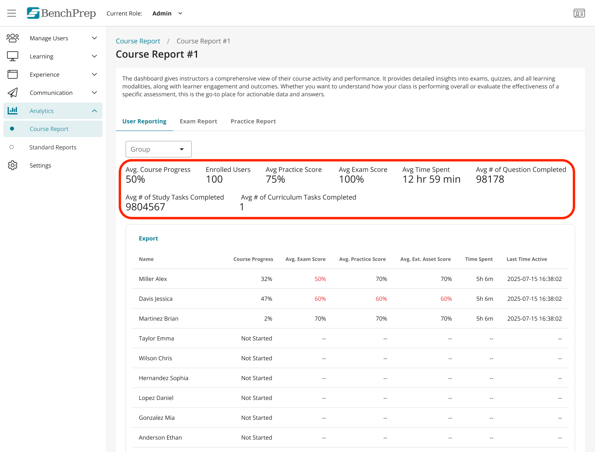
We’ve added new course-level rollup metrics in Course Reports - User Reporting tab to provide a clearer view of learner engagement and performance across courses.
New data points include average course progress, enrolled users, study tasks completed, practice and exam scores, time spent, questions completed, and curriculum tasks completed.
Admins can also configure which metrics are displayed through a single feature access control.
Expanded User Performance Reporting
We’ve expanded reporting capabilities across BenchPrep Analytics with new columns added to several dashboards.
Updates include:
- New learner activity and engagement fields in the Course Report → User Detail table
- Alternative options for scoring and completion metrics in the User Detail → Practice Category table
- Expanded performance metrics in the User Detail → Exam Breakdown table
These enhancements can be optionally turned in Feature Access and provide admins and instructors with deeper visibility into learner progress, practice activity, and exam performance.
Enhanced Session Detail Reporting
We’ve enhanced Session Detail reporting with additional learner activity and engagement fields for improved analytics and exporting.
New fields include user and session identifiers, group and branch data, content package information, completion metrics, and expanded time-spent tracking across lessons, practice, exams, discussions, flashcards, games, and more.
View the full list of new columns available in Session Detail Reports here.
Improved Question Preview Visibility
We’ve improved question preview visibility in BenchPrep Analytics reporting.
Previously, question previews were only displayed for single and multiple choice questions. With this update, analytics users can now view question previews across all question types, including on the question detail page. This creates a more consistent experience with BluePrint and provides better context when reviewing learner performance data.
New Practice Category Performance Metric
We’ve added a new practice performance metric in BenchPrep Analytics to give instructors more flexibility when reviewing learner progress by category.
Instructors can now view percent correct based on the total number of questions available in a category, in addition to percent correct based on questions attempted. This provides a fuller view of learner completion and performance across parent and child categories.
Console
Improved License Visibility in Console
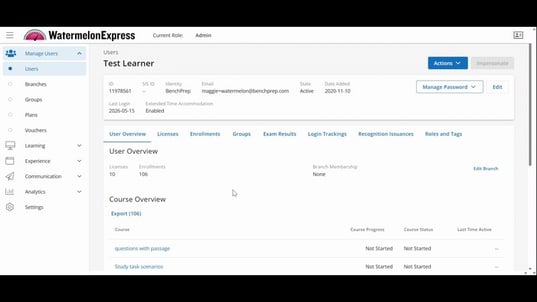
We’ve improved the Licenses view in Console to provide clearer visibility into course enrollments tied to licenses.
Admins can now view course IDs and course titles directly from the Licenses tab, making it easier to manage license expirations, maintain accurate records, and identify the correct course associated with each license.
Download Branch Plan Details as CSV in Console
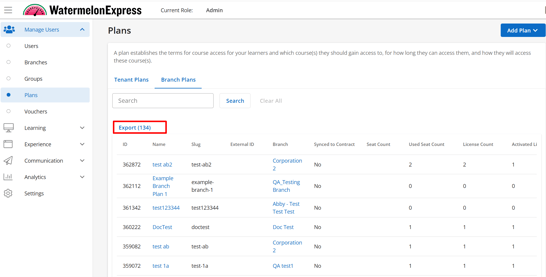
Console admins and users with the “Export branch plans” permission can now export Branch Plan data as a CSV from the Branch Plans tab in Console.
Exports include plan details such as ID, Plan Name, Plan Type, Status, License Type, Available Seats, Users Added, Users Active, Start Date, and End Date. Exported data is automatically scoped to the user’s access level, and each export is recorded in the audit log.
AI Assistant
Improved AI Assistant Responses with Updated OpenAI Model
We’re introducing an updated OpenAI model in the AI Assistant to improve response quality, question handling, and knowledge accuracy.
This update allows the AI Assistant to better interpret learner questions, provide more up-to-date responses, and improve reliability when working with course-specific content. The updated model will be automatically introduced with no action needed on your end.
BluePrint
New course-level metadata in BluePrint
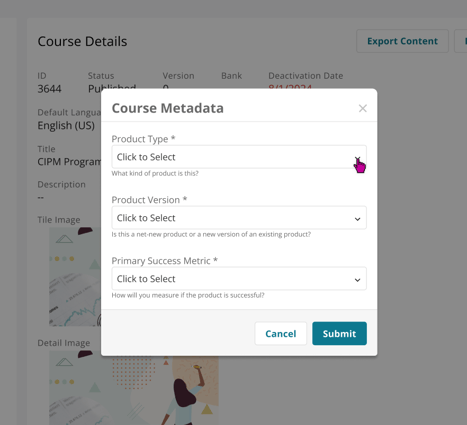
We’ve introduced structured Course Metadata to help teams better manage, track, and understand their offerings.
When creating or building a new course, users will now be able to enter key information such as Product Type, Product Version, and Primary Success Metric. These fields help ensure consistency and improve visibility across products.
For existing published courses, this prompt will appear the next time a course is built if any required details are missing. Once added, these details can be viewed and updated from the course details page and used to filter courses in the course list in BluePrint. These data points are also available via Snowflake
Please note that these details are for internal use only and are not visible to learners.
Updated Terminology in BluePrint
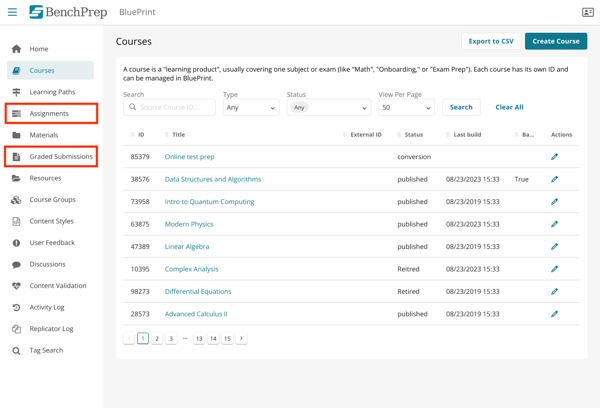
We’re updating some terminology across BluePrint to create a more intuitive and consistent experience.
As part of this update:
- “Curriculums” will now appear as “Assignments”
- “Assignment Grading” will now appear as “Graded Submissions”
These updates are naming changes only and do not impact existing functionality or workflows.
Custom Practice: Study Tasks Now Available
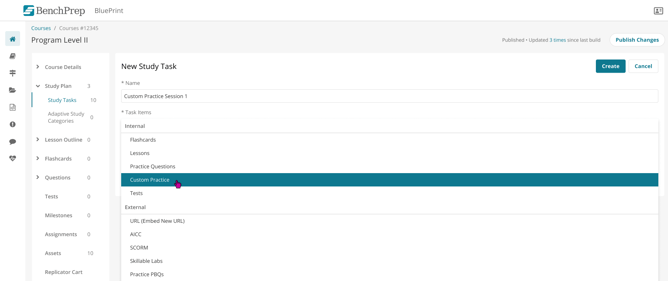
Admins can now add Custom Practice as a Study Task within study plans.
These tasks direct learners to the Custom Practice page and can be configured with a minimum question threshold. Once learners complete the required number of Custom Practice questions, the study task will automatically be marked complete.
Enhanced content propagation across and within courses
We’ve made it easier to update replicated content across and within courses.
You can now apply changes to all instances of content within the same course, then automatically sync those updates to other courses. This reduces the need for manual edits and helps keep content consistent everywhere it’s used.
Self-service Adaptive Study Plans
We’re introducing early support for self-service Adaptive Study Plans, giving organizations more control over how adaptive learning experiences are created and managed.
Admins can now begin setting up Adaptive Study Plans through CSV import, enabling the creation of plans along with their associated categories in a more scalable way. This reduces reliance on manual setup and streamlines the process of aligning content to adaptive learning structures.
This update lays the groundwork for more flexible, self-service management of Adaptive Study Plans, with additional enhancements coming in future releases.
Learn more about Adaptive Study Plans here.
Hide Content Visibility in Courses
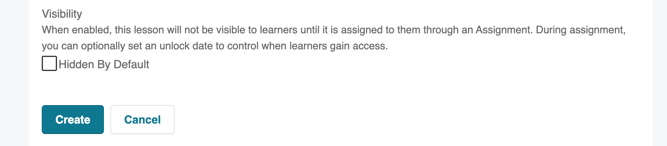
Instructors and admins can now control when learners gain access to exams, practice questions, flashcards, and lessons within a course.
With new content visibility controls, teams can hide content until it is ready to be released, prevent learners from accessing materials too early, and manage staged content rollouts more effectively across a course experience.
Schedule When Course Content Becomes Available with Assignments
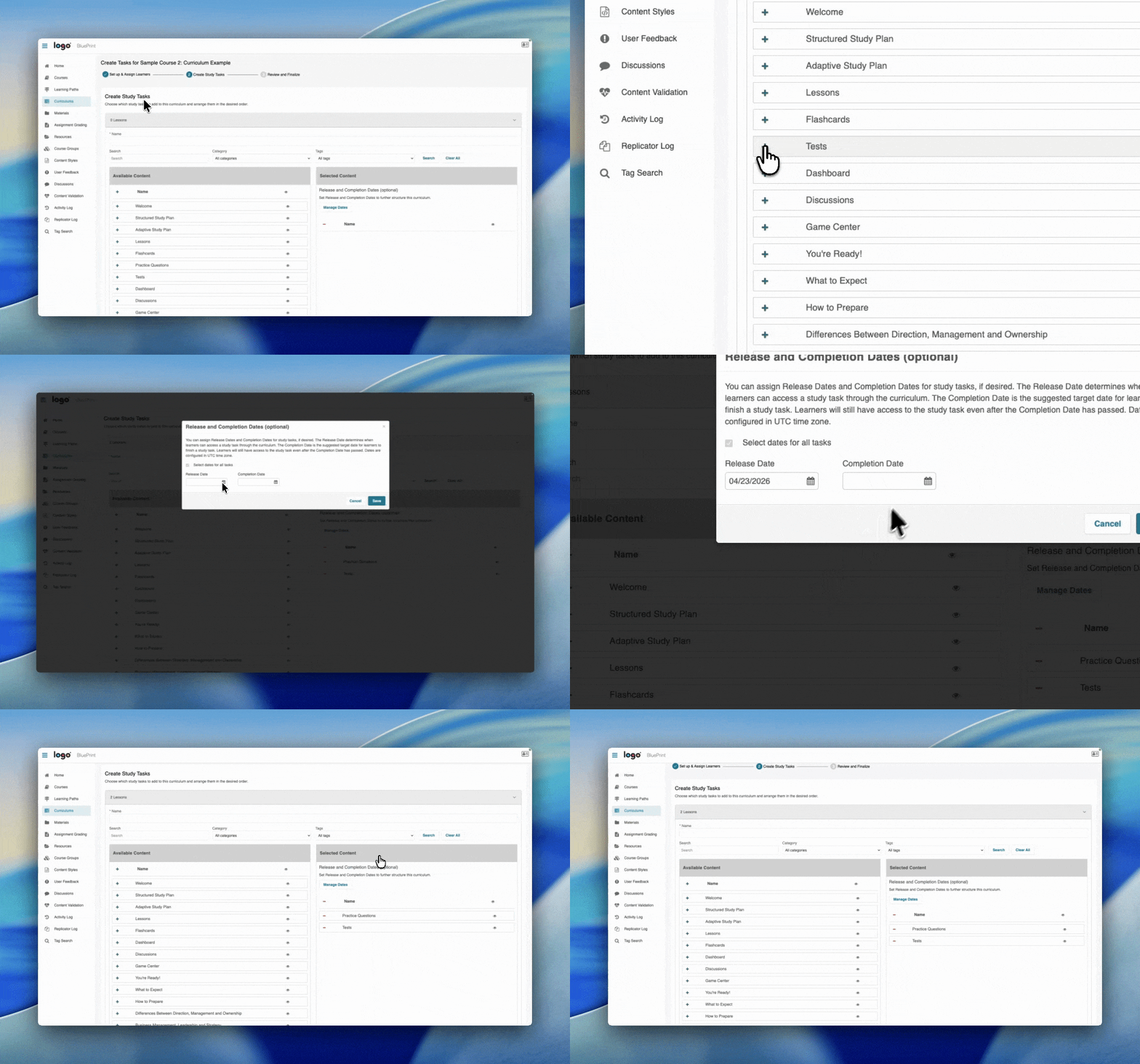
Instructors and admins can now schedule content availability on BluePrint. Content can now be hidden until assigned via Assignments and can be given open and/or close dates at the time of assignment. Until the scheduled release date, content will be locked and inaccessible to learners in the course.
Scheduled unlocking can be managed at the course, group, or individual learner levels, allowing instructors to align access with their ideal timeline.
Learn more about scheduling Assignments here.
Learner Experience (WebApp)
Custom Practice: New Passage-Based Experience
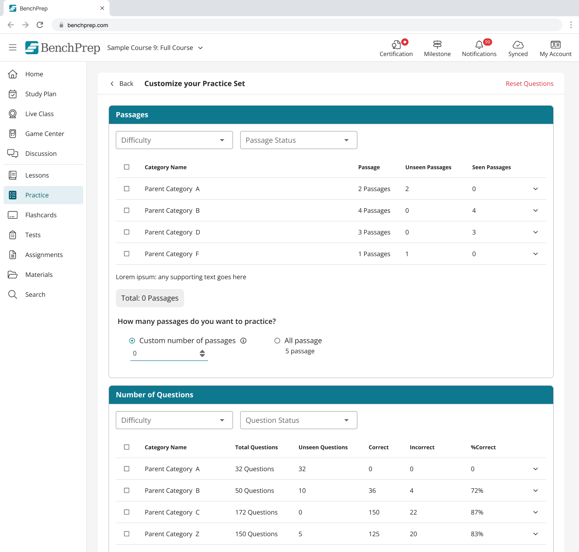
We’ve added a new Passages section to Custom Practice, allowing learners to build practice sessions around passages instead of individual questions.
Learners can now filter passages by category, difficulty, and status, then choose a specific number of passages or include all available passages in a session. When a passage is selected, all associated questions are automatically included together to create a more cohesive practice experience.
Flashcards: Improved Filtering and Printing
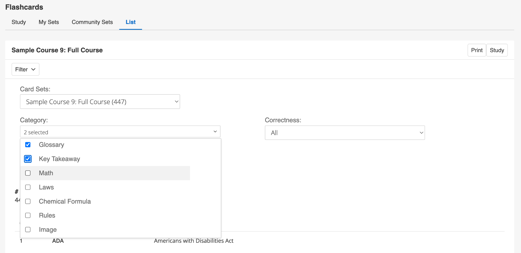
We’ve improved flashcard filtering across both Study and List views to give learners more flexibility when creating and reviewing flashcard sets.
Learners can select multiple categories when building flashcard study sessions and apply filters directly within the List view before printing. These updates make it easier to create customized flashcard sets, narrow content to relevant topics, and print targeted subsets of flashcards instead of entire collections..
Mobile App
Improving Session Logouts Persistence
Users will now remain logged in between app sessions, eliminating the need to log in each time the mobile app is reopened.
This reduces friction and provides a smoother, faster experience when returning to the app.
Snowflake
Changes to our data schema for Snowflake customers
We have updated our data schema with changes for Q1 and Q2. Details about the changes can be found in the data dictionary beginning on May 21, 2026.


